
Supermicro SYS-751A-I Review (2026)
A build-to-order full-tower workstation with dual Xeon Scalable sockets, sixteen DDR5 DIMM slots, six PCIe 5.0 expansion slots and room for two double-width GPUs — convertible between a desk-side tower and a 5U rack chassis. Built for CAD, rendering and engineering simulation, not AI training clusters.
GO33 may earn a commission from qualifying purchases via the link above, at no extra cost to you. This does not affect our independent testing or scoring. Learn more.
Supermicro SYS-751A-I in Detail
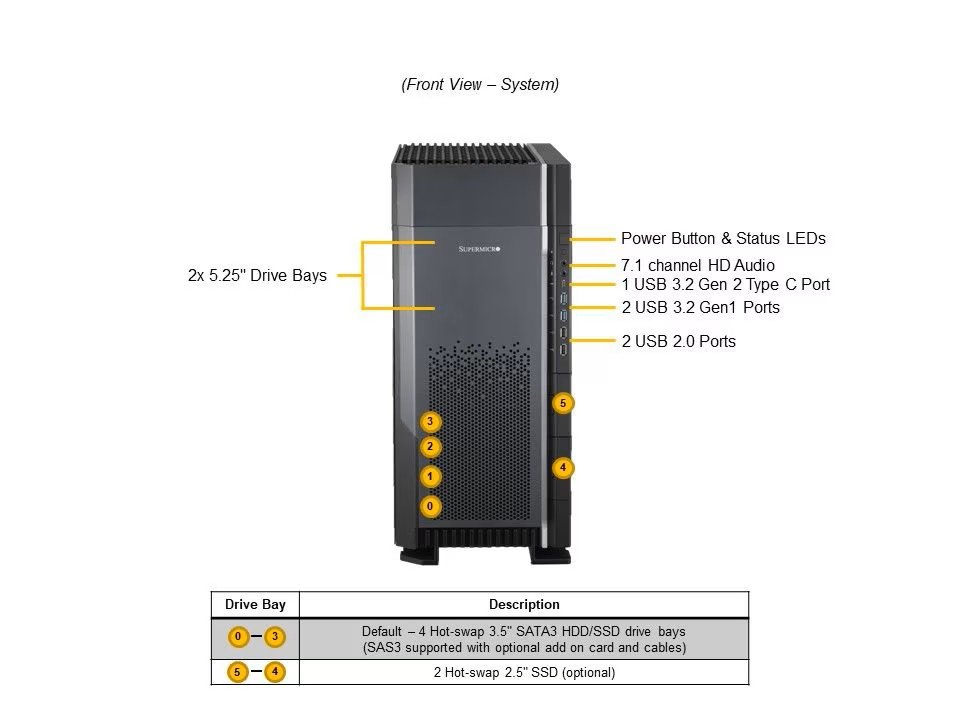 Front View
Power/status LEDs, 7.1-channel audio, USB 3.2 Gen2 Type-C, and four front-fixed 3.5" drive bays.
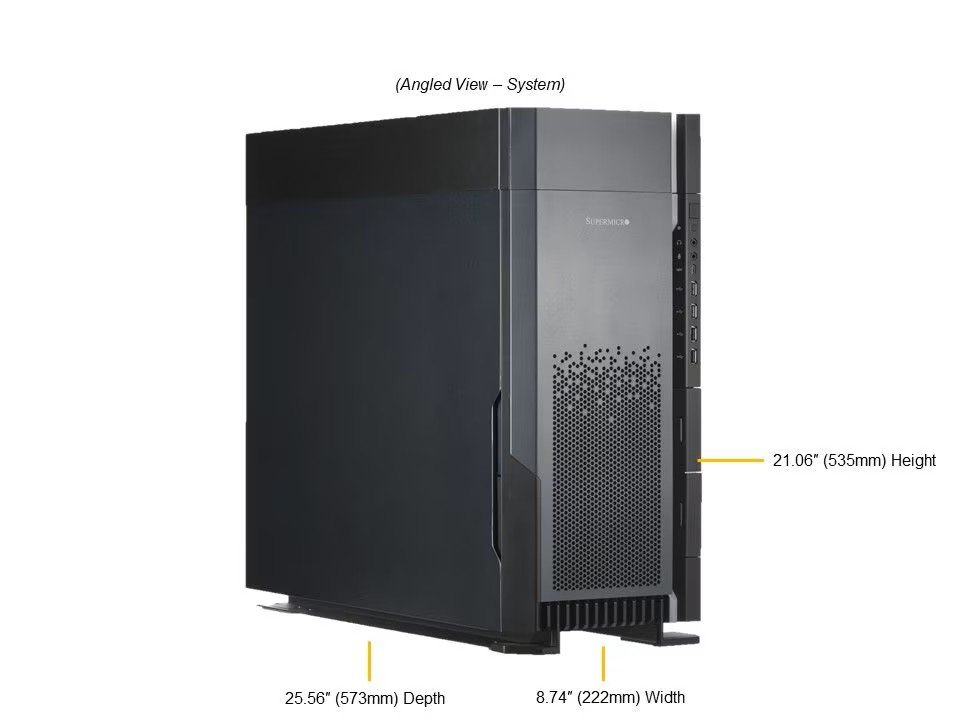 Angled View
21.06 in (535mm) H x 8.74 in (222mm) W x 25.56 in (573mm) D — convertible to 5U rackmount.
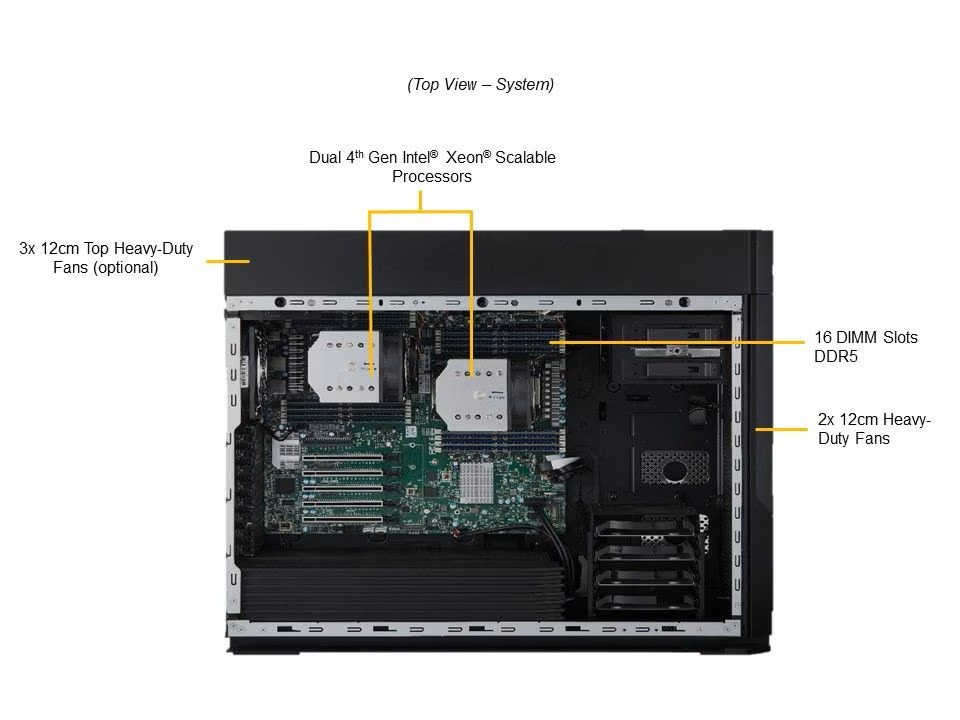 Internal View
Dual 4th/5th Gen Intel Xeon Scalable sockets, 16 DDR5 DIMM slots, and heavy-duty case fans.
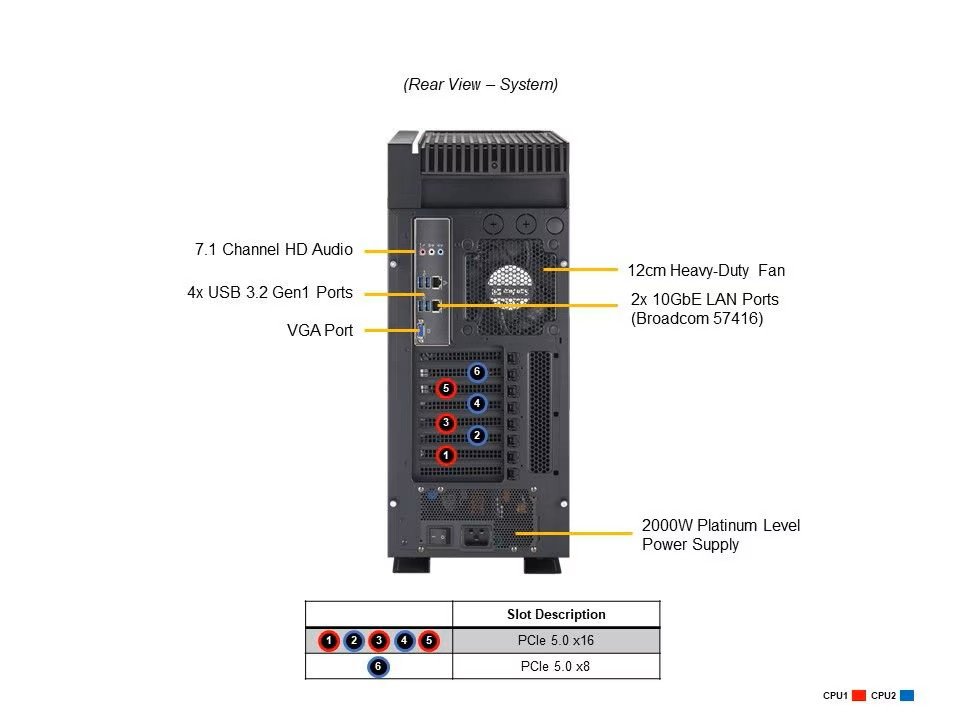 Rear View
Dual 10GbE RJ45 LAN, 4x USB 3.2 Gen1, VGA, and a 2000W Platinum-level power supply.
Supermicro SYS-751A-I Spec Table
| Specification | Detail |
|---|---|
| Brand & Model | Supermicro SYS-751A-I |
| Form Factor | Full-Tower, convertible to 5U Rackmount |
| Motherboard | Supermicro X13DAI-T |
| CPU | Dual Socket E (LGA-4677), 5th/4th Gen Intel Xeon Scalable, up to 64C/128T, up to 320MB cache per CPU, up to 350W TDP (air-cooled) |
| System Memory | 16x DDR5 DIMM slots; up to 2TB with 16x128GB RDIMMs (1DPC, as currently configurable) |
| Storage (Default) | 4x front-fixed 3.5" NVMe/SAS/SATA drive bays |
| Storage (Option A) | 4x internal 3.5" NVMe/SATA + 2x front 2.5" SATA (6 bays total) |
| M.2 Slots | 2x M.2 NVMe (2280/22110) |
| Expansion Slots | 5x PCIe 5.0 x16 FHFL + 1x PCIe 5.0 x8 FHHL |
| GPU Support | Up to 2 double-width active GPUs |
| Networking | 2x 10GbE RJ45 (onboard) |
| I/O | 1 VGA, 6x USB 3.2 Gen1, 2x USB 3.2 Gen2, 2x USB 2.0, 7.1-channel HD audio |
| Power Supply | 2000W Platinum Level |
| Dimensions | 21.06 in (535mm) H x 8.74 in (222mm) W x 25.56 in (573mm) D |
Ready to configure your SYS-751A-I?
- Specifications cross-checked directly against Supermicro’s official SYS-751A-I product page and eStore configurator (checked September 2, 2026)
- Build-to-order pricing and configuration options verified live on store.supermicro.com at time of writing
- Workload fit assessed against publicly documented Intel Xeon Scalable (5th/4th Gen) platform behavior for CAD, rendering and simulation software
- No vendor input into scoring, pros/cons, or verdict
Pros
- Five PCIe 5.0 x16 slots plus dual GPU support give this workstation real expansion headroom most towers lack
- Dual 5th/4th Gen Xeon Scalable support with up to 64 cores per socket handles heavy multi-threaded CAD and simulation workloads
- Up to 2TB of DDR5 ECC memory across 16 DIMM slots is a genuine ceiling for large assemblies and datasets
- Convertible tower-to-5U form factor works equally well on a desk or in a rack
- Full-size 2000W Platinum PSU and standard USB/audio I/O keep it usable as a real workstation, not just a bare compute box
Cons
- This is a build-to-order workstation, not a fixed SKU — pricing and lead time depend entirely on the configuration chosen
- Air-cooled up to 350W per CPU means the highest-core Platinum SKUs need serious case airflow and a properly ventilated room
- GPU support tops out at two double-width cards — not a scale-out multi-GPU training box
- No liquid cooling option at this tier — thermal headroom depends entirely on chassis fans and ambient conditions
Dual Xeon Scalable, Sixteen DIMM Slots, Real Expansion Room
At the center of the SYS-751A-I is Supermicro’s X13DAI-T motherboard, built around dual Socket E (LGA-4677) sockets that accept both 5th and 4th Gen Intel Xeon Scalable processors — up to 64 cores and 128 threads per socket, with up to 320MB of cache per CPU and TDPs as high as 350W on the top-end Platinum parts. That’s a genuinely wide range: Supermicro’s own configurator lets you spec anything from a modest 12-core Xeon Silver 4410Y up to a 52-core Platinum 8470, so the same chassis covers a solo CAD workstation and a heavily multi-threaded simulation rig.
System memory runs through sixteen DDR5 DIMM slots. Supermicro’s own product page lists a confirmed maximum of 2TB at 1DIMM-per-channel using 128GB RDIMMs — the actual buildable ceiling on the eStore configurator today — though the site’s own marketing copy elsewhere claims "up to 4TB," which isn’t yet reflected in any purchasable configuration. Treat 2TB as the number you can actually order; 4TB reads as a platform ceiling for future higher-density DIMMs rather than something on the shelf now.
Storage, Expansion, and GPU Support
Storage defaults to four front-fixed 3.5" NVMe/SAS/SATA drive bays, with an alternate configuration (Option A) swapping in two front-access 2.5" SATA bays alongside four internal 3.5" bays for six total. Either way, two M.2 NVMe slots (2280/22110) sit on the board itself, and two optional 5.25" peripheral bays are available if you need optical or other legacy drives.
Expansion is where this chassis distinguishes itself from a typical prosumer tower: five PCIe 5.0 x16 FHFL slots plus one PCIe 5.0 x8 FHHL slot, officially rated to support up to two double-width active GPUs. Combined with a 2000W Platinum-level power supply and six-plus USB ports across front and rear (including USB 3.2 Gen2 Type-C), it’s built to actually host serious add-in hardware, not just accept it in theory.
GO33 Workload Readiness
Best Used For
Dual high-core Xeon Scalable plus up to 2TB DDR5 comfortably handles large assemblies in SolidWorks, Inventor, and similar packages.
Two double-width GPU slots plus PCIe 5.0 bandwidth suit GPU-accelerated rendering and engineering simulation pipelines.
Supermicro positions this explicitly for AEC and engineering-simulation workloads — the CPU core count and memory ceiling back that up.
Buying Considerations
This is a build-to-order platform, not a single fixed SKU — the CPU, memory, storage, and networking options you pick directly drive both the price and the lead time, so budget accordingly and configure through Supermicro’s own eStore rather than assuming one "starting price" applies. Air cooling handles the full CPU range, including 350W parts, but that means chassis airflow and room ventilation matter more as you move up the Xeon stack — there’s no liquid-cooling option at this tier.
Frequently Asked Questions
A genuinely flexible dual-Xeon workstation, if you configure it deliberately
The SYS-751A-I’s real strength is expansion headroom — five PCIe 5.0 x16 slots, room for two GPUs, and a memory ceiling most towers can’t touch. It rewards buyers who configure it deliberately for their actual workload rather than defaulting to the base spec.